
1. Introduction
Knowledge workers are swimming in artificial intelligence tools. In a dizzying two-year sprint, the average corporate tech stack exploded from just two AI applications in 2023 to seven by 2026, with 80% of employees now relying on AI to navigate their workdays. Yet, if you ask those same workers how they feel, the answer isn’t “liberated.” It’s overwhelmed, fragmented, and perpetually behind.
We have arrived at a bizarre technological paradox: the more automated assistants we deploy, the busier we seem to become.
Downloading a half-dozen specialized micro-apps isn’t the secret to reclaiming your afternoon. True productivity gains don’t come from software collection—they come from smart workflow design and a clear-eyed understanding of how AI actually alters human performance. Having tested dozens of modern tools and analyzed organizational data, here is the operational reality behind the hype: a curated breakdown of the most counter-intuitive takeaways, performance sweet spots, and workflow shifts reshaping work in 2026.
2. The AI Productivity Sweet Spot Is Smaller Than You Think (The 7–10% Rule)
We’ve been sold a dangerous linear fallacy: if thirty minutes with an AI assistant saves a slice of your morning, spending five hours inside AI applications must make you ten times more productive. Workplace data proves the exact opposite.
Data from ActivTrak reveals that spending more time inside AI applications does not linearly scale output. Employees who spend 7% to 10% of their total working hours using AI tools achieve the highest productivity gains. The moment usage crosses that 10% threshold, productivity plateaus—and then actively drops.
“Employees spending 7-10% of their total work hours in AI tools achieve the highest productivity. Above that window, productivity plateaus or drops.”
Why does more AI lead to worse outcomes? Beyond the 10% mark, knowledge workers fall victim to “cognitive thrashing.” Instead of executing deep, core work, they sink hours into context-switching between separate browser windows, refining endless prompts, and manually verifying generated output. The quality of your AI interactions matters far more than raw volume; efficiency lives in targeted, surgical application rather than continuous interaction.
- The 0%–6% Zone (Under-utilization): Manual effort dominates; missed opportunities for routine task deletion.
- The 7%–10% Zone (The Sweet Spot): Targeted AI integration that accelerates drafting, scheduling, and research without fragmenting focus.
- 10%+ Usage (Cognitive Thrashing): High tool sprawl, continuous prompt tweaking, output verification taxes, and severe context fragmentation.
3. The $4.4 Trillion Opportunity Is Trapped in Bad Workflow Design
According to McKinsey’s Superagency report, generative AI represents a staggering $4.4 trillion annual productivity opportunity for the global economy. Yet, that same research reveals a stark reality: only 1% of business leaders believe their organization has reached full AI maturity.
This massive gap between theoretical ROI and actual workplace output isn’t a software failure—it is a workflow design failure.
Enterprise pilot programs routinely fail to deliver headline returns because managers simply dump shiny new AI applications onto obsolete, unchanged processes. Automating a single, isolated step—like using an LLM to draft an email 40% faster—delivers net-zero organizational gain if the manual handoffs between teams and applications remain broken. Real transformation requires rebuilding the operational process around the capabilities of the tool, rather than forcing modern software into vintage routines.
4. The “Invisible AI” Shift: Why Bot-Free and Local-Context Tools Are Winning
In the early wave of AI adoption, tools announced themselves loudly. Visible meeting bots like “OtterPilot” would request entry to video calls, take up a tile in the participant grid, and record every word. The result? Severe social friction. Meeting attendees froze up, edited themselves, or went quiet the moment a recording bot entered the room.
In 2026, modern workflows are rapidly abandoning intrusive interfaces in favor of ambient, “invisible” AI that operates quietly in the background:
- Granola: A privacy-first meeting notepad that captures audio directly from your local system sound and microphone—without sending a visible bot into the call. It pairs live transcription with your handwritten notes and automatically deletes the raw audio post-transcription to minimize the data footprint.
- Wispr Flow: A global, voice-to-text dictation layer that runs across every desktop text box (Gmail, Slack, Cursor, or Notion). It strips out filler words (“ums” and “ahs”), catches mid-sentence self-corrections in real time, and matches tone to the active app.
- Claude Cowork: Moves past isolated browser chat windows by integrating directly with desktop environments. Leveraging a massive 200k+ token context window, it can open, edit, and save local files directly in your computer’s directories, eliminating copy-paste friction entirely.
The shift is clear: early AI required you to leave your work to talk to a chatbot. Modern AI lives quietly where you already work, eliminating tab-switching and social awkwardness.
5. Knowledge Workers Lose 60% of Their Day to “Work About Work”—and AI’s Real Job Is Deleting It
Asana’s Anatomy of Work research yields a sobering statistic: knowledge workers spend 60% of their workday on “work about work.” Instead of executing the specialized skills they were hired for, workers drown in administrative coordination, chasing status updates, hunting for buried documents, and managing handoffs across disconnected apps. As a result, U.S. workers miss 36% of their planned weekly deadlines.
“On its own, data has zero value.” — Bill Schmarzo
Data expert Bill Schmarzo’s principle cuts straight to the problem: raw project data sitting inside Jira, Asana, or Google Docs is useless until it drives action. The real job of AI is not generating longer memos or typing emails faster; it is digesting administrative data to delete coordination overhead entirely:
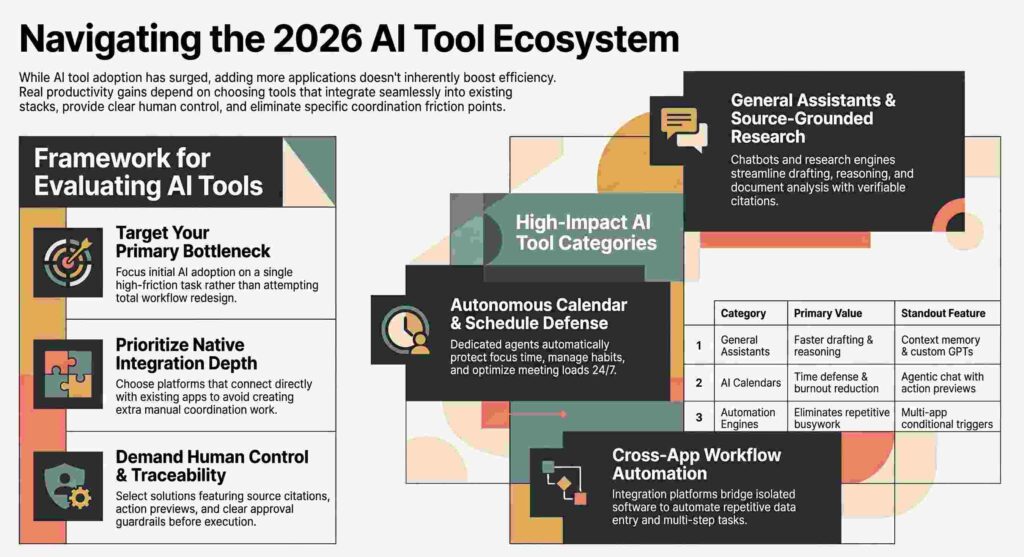
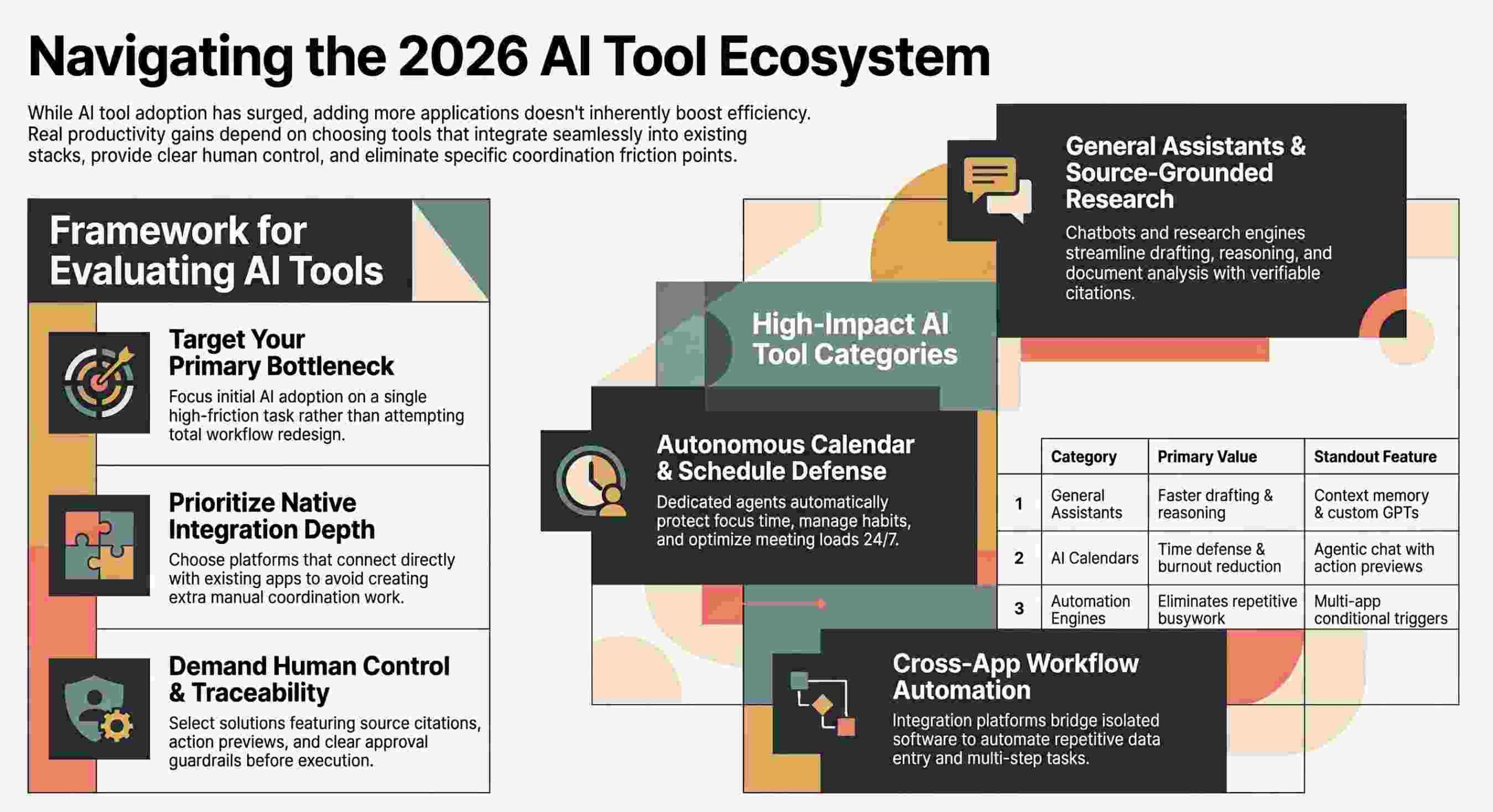
- Reclaim.ai: An AI calendar engine that defends deep-work focus time, automatically schedules recurring habits, adds post-call decompression buffers, and reschedules smart meetings when conflicts arise.
- Zapier & n8n: Automation backbones that bridge data gaps between isolated SaaS stacks, routing leads and updating databases without manual copy-pasting.
- Asana AI: Automatically breaks project scopes down into subtasks, rolls up task progress into automated status reports, and flags project health risks before deadlines slip.
6. The Leadership-Contributor Adoption Gap Is Creating Broken Systems
Data from Gallup highlights a dangerous operational disconnect within modern organizations: 67% of executive leaders use AI frequently, compared to just 46% of individual contributors (ICs).
This split creates broken operational systems. Executives—enthused by high-level AI demos—frequently mandate software adoption from the top down without understanding the tactical daily realities of their staff. Individual contributors, who complete barely half (53.5%) of their planned weekly tasks, are suddenly forced to adopt tools that don’t fit their actual task execution workflows.
When leadership buys software licenses without offering operational guidelines, workflow redesigns, or tactical support, the software quickly becomes expensive shelfware. Buying tools is easy; aligning software capabilities with the real-world workflows of individual contributors is where productivity is won or lost.
7. The Hallucination Tax: Grounded AI Is Replacing General Search
In professional environments, unverified AI assertions carry a steep tax. Spending 15 minutes checking, fact-checking, and correcting a confident AI hallucination completely negates the 5 minutes saved using AI to draft the text in the first place. High-stakes enterprise environments are rapidly abandoning open-ended web generators in favor of source-grounded architectures:
- NotebookLM: Google’s research environment operates strictly on uploaded source material (PDFs, docs, Slides, URLs). Capped at 50 sources and 500,000 words per source, it yields zero-hallucination Q&A accompanied by clickable, passage-level citations.
- Perplexity: A conversational research engine that pairs live web queries with inline, verifiable source links, eliminating blind web speculation.
- ThoughtSpot / Spotter: An enterprise analytics tool featuring “Spotter,” a dedicated AI analyst that provides explainable AI outputs, transparent data lineages, and human-in-the-loop controls for complex data visualization.
Grounding turns unpredictable natural language processing into trustworthy, audit-ready business output.
8. Conclusion & Final Reflection
Succeeding in 2026 isn’t about collecting a stack of 19 different AI applications. It comes down to identifying one or two tools that directly delete your primary administrative time-sinks, integrating them deeply into your existing routine, and keeping your usage strictly within the optimal 7% to 10% working-hour window.
Before you download another desktop app, take a hard look at your calendar and task manager:
Which daily task in your schedule represents pure “work about work”—and are you willing to redesign your routine to let an AI delete it entirely?
❓ తరచుగా అడిగే ప్రశ్నలు (FAQs)
ఈ వార్త లేదా కథనంలో ముఖ్యమైన అంశం ఏమిటి?
Why More AI Tools Are Making You Slower in 2026—and the 7% Rule That Fixes It గురించిన పూర్తి సమాచారం మరియు తాజా ముఖ్యాంశాలు ఈ కథనంలో సమగ్రంగా వివరించబడ్డాయి.
ఈ తాజా పరిణామం ఎందుకు ప్రాధాన్యత సంతరించుకుంది?
ప్రజా ప్రయోజనాలు, సంబంధిత వర్గాలు మరియు ప్రస్తుత పరిస్థితుల దృష్ట్యా ఈ పరిణామం అత్యంత కీలకమైనదిగా మారింది.
ఈ అంశంపై అధికారిక వివరాలు మరియు తాజా అప్డేట్స్ ఎక్కడ తెలుసుకోవచ్చు?
సంబంధిత అధికారిక వర్గాలు వెల్లడించే తదుపరి సమాచారం మరియు ప్రత్యక్ష అప్డేట్స్ కోసం మా వెబ్సైట్ను నిరంతరం ఫాలో అవ్వండి.