
1. The Promise, the Paradox, and the AI Revolution
Generative AI was sold to the C-suite as an instantaneous productivity force multiplier. Enterprise deployments of Microsoft Copilot promised to eradicate mundane administrative drag, synthesize enterprise knowledge on demand, and unleash an era of unparalleled organizational velocity.
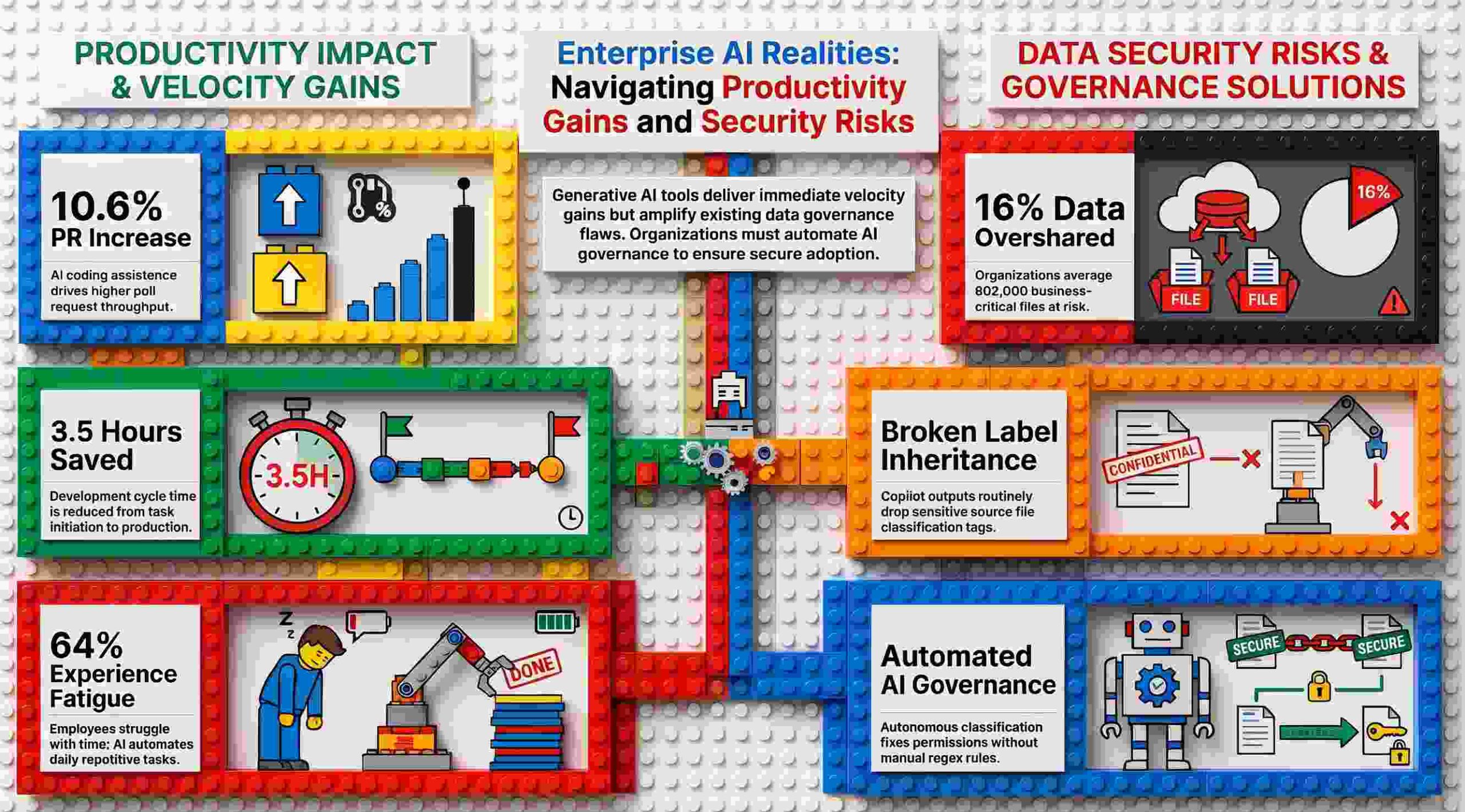
Yet, behind the slick vendor demonstrations and aggressive seat licensing rollouts lies an infinitely more complex operational reality. As fortune-ranked enterprises deploy these tools at scale, frontline CISOs, CIOs, and engineering leaders are uncovering jarring side effects, unforeseen security vectors, and counter-intuitive workflow dynamics.
The fundamental friction facing modern technology leaders is not that generative AI fails to work. It is that AI works with uncompromising fidelity—amplifying whatever data structures, permission models, and operational bottlenecks already exist across the enterprise.
For technology leaders navigating this frontier, achieving AI readiness requires stripping away marketing narrative and confronting the raw operational data. Examining deployments across global enterprises reveals five critical, hard-learned lessons from the frontlines of AI adoption.
2. Copilot Doesn’t Have a Security Problem—Your Organization Does
A pervasive misconception among executive boards is that deploying generative AI introduces a rogue, self-contained threat vector directly within the AI model itself. In practice, tools like Microsoft Copilot act primarily as an intelligence-gathering amplifier for an organization’s pre-existing data governance failures.
Copilot does not bypass security models; it honors them precisely. The system inherits the exact Microsoft 365 permission boundary assigned to the executing user account. It effectively holds the “keys to the kingdom,” programmatically searching across every SharePoint site, Teams channel, Outlook inbox, and OneDrive folder that the user has authorization to view. Consequently, Copilot’s greatest vulnerability stems directly from rampant corporate over-permissioning.
Data from Concentric AI’s Data Risk Report, which analyzed over 550 million unstructured enterprise records across finance, technology, healthcare, and energy sectors, illustrates the staggering scope of this internal exposure:
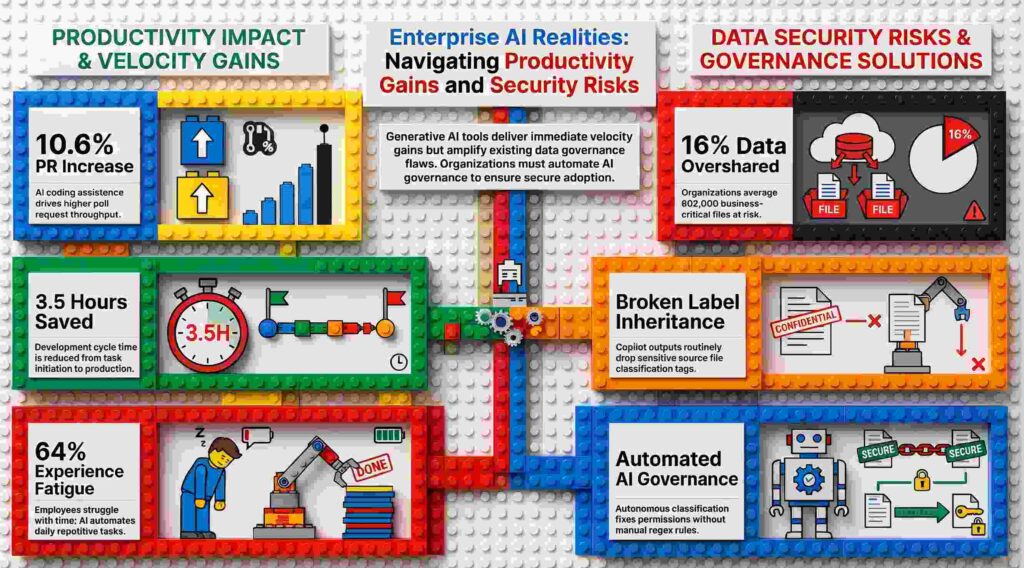
- 16% of business-critical data is overshared, leaving an average of 802,000 files at risk per enterprise.
- 83% of at-risk files are overshared internally with unauthorized colleagues or broad internal groups.
- 90% of business-critical documents are shared outside the C-suite.
- Over 15% of all business-critical files are actively at risk due to excessive permissions, inappropriate classification, or improper sharing settings.
- Over 3% of sensitive enterprise data is shared organization-wide without restriction.
While CISOs routinely focus on preventing external threat actors from exfiltrating intellectual property, the immediate threat introduced by AI is internal data discovery. When access controls are loosely configured, Copilot allows lower-tier employees to effortlessly query and surface highly confidential material that was previously hidden behind obscure folder hierarchies.
This friction manifests in everyday operational workflows across every major department:
- Finance: A financial analyst asks Copilot to draft a performance summary, and the model seamlessly pulls unreleased earnings data from an over-permissioned folder, exposing market-sensitive figures before public disclosure.
- Human Resources: An HR manager drafts a departmental update, and Copilot synthesizes source files containing unredacted employee performance reviews and Personally Identifiable Information (PII) accessible to non-HR staff.
- Research & Development: A development team brainstorms future feature roadmaps, only for Copilot to pull detailed patent filings and proprietary IP descriptions into an unencrypted shared document.
- Marketing: A campaign planner compiles market research, inadvertently surfacing internal customer feedback that includes critical, confidential assessments of unreleased product lines.
Microsoft explicitly outlines this reliance on foundational tenant security within its enterprise documentation:
“It’s important that you’re using the permission models available in Microsoft 365 services, such as SharePoint, to help ensure the right users or groups have the right access to the right content within your organization.”
3. The “Classification Gap” Means Built-In Tools Like Purview Can’t Catch Everything
Beyond indexing existing content, generative AI continuously synthesizes and outputs new unstructured files. This dynamic creates a critical security blind spot known as the “classification gap”: Copilot outputs do not consistently inherit sensitivity labels or access controls from their underlying source documents.
When Copilot digests five confidential source files to draft a single executive brief, the newly synthesized document is often generated entirely unclassified by default. If an employee uploads this generated brief to a public channel, sensitive business insights bypass security parameters entirely.
Relying solely on rules-based, legacy enforcement platforms like Microsoft Purview creates an operational Catch-22:
- Purview’s Constraint: Purview enforces Data Loss Prevention (DLP) rules and encryption policies against files that already carry accurate security labels.
- The Enterprise Reality: Purview cannot enforce policies on unlabeled or incorrectly tagged files. Because hundreds of thousands of legacy enterprise files sit completely unlabeled, Purview operates with a massive blind spot—one that Copilot freely queries and indexes.
If an enterprise’s underlying data classification is clean, Purview and Copilot operate in harmony. If the underlying data environment is chaotic, rules-based tools merely govern the chaos without fixing the root cause. Bridging this gap requires autonomous security controls capable of evaluating context and auto-labeling generated content in real time.
| Governance Dimension | Standard Built-In Labeling (e.g., Purview) | Autonomous AI Classification (e.g., Concentric AI) |
| Primary Function | Enforces policies and DLP rules on data that is already labeled. | Uses Natural Language Processing (NLP) to discover, categorize, and auto-label output. |
| Handling Unlabeled Data | Cannot evaluate or enforce rules on unlabeled or improperly labeled files. | Contextually analyzes structured/unstructured content to identify risk without existing labels. |
| Operational Requirement | Depends on pre-configured rules, regex, manual end-user tagging, and policy setup. | Operates autonomously without requiring complex rules, regex, or end-user intervention. |
| Remediation Capabilities | Restricts files matching specific pre-defined policy conditions. | Autonomously flags inappropriate sharing/permissions and adjusts access controls centrally. |
4. The AI Velocity Paradox—Faster Coding Creates Downstream Bottlenecks
In software engineering, the deployment of AI coding assistants like GitHub Copilot has delivered measurable local efficiency gains. However, accelerating single-stage output does not inherently translate to accelerated software delivery. This systemic disconnect is known as the “AI Velocity Paradox.”
A multi-month study conducted by Harness SEI, tracking 50 enterprise developers using GitHub Copilot, quantified the direct impact on software development workflows:
- 10.6% Increase in Pull Requests (PRs): Developers generated, committed, and submitted significantly more code iterations when assisted by AI.
- 3.5-Hour Reduction in Cycle Time: The duration from initial task initiation to code deployment decreased by an average of 3.5 hours—a 2.4% net efficiency improvement.
While these metrics prove that front-end code generation speeds up, they reveal a critical operational reality: accelerating code creation without upgrading downstream pipelines simply transfers friction further down the delivery chain.
Flooding engineering pipelines with a 10.6% surge in pull requests creates severe backlogs if manual code review bandwidth, static testing suites, and deployment validation workflows remain unchanged. Accelerating front-end syntax generation while maintaining rigid code review capacity simply generates technical debt and peer-review bottlenecks at scale. True software delivery speed requires optimizing the end-to-end lifecycle rather than hyper-focusing on raw line-of-code creation.
5. The Next Frontier of Threat Isn’t Passive Search—It’s Agentic AI
The enterprise threat landscape has shifted fundamentally from passive AI interaction—where an employee manually submits a search query—to autonomous agentic architectures. Built via environments like Copilot Studio, enterprise AI agents no longer just retrieve text; they actively push multi-step workflows, schedule events, execute code, and query transactional databases across M365 without requiring human intervention at every step.
Because these agents act autonomously using real employee credentials, elevated system permissions, and live system access, they introduce threat categories that traditional access controls were never designed to manage:
- The EchoLeak Vulnerability: Uncovered in June 2025, security researchers exposed a “zero-click” attack vector targeting AI agents. An attacker could compromise an agent simply by sending a targeted email to a user. Without requiring link clicks, attachment executions, or user interaction, the incoming payload manipulated the agent into silently extracting and exfiltrating data from connected M365 sources.
- Prompt Injection at Scale: Malicious instructions embedded within routine business documents, emails, or chat threads can override an LLM’s system instructions. In documented exploit chains, prompt injections manipulated Copilot into searching a user’s inbox without confirmation, invisibly encoding sensitive email threads, and transmitting the data to external command-and-control servers via embedded links.
- Copilot Studio Misconfigurations: Enterprise research reveals that common configuration choices—such as agents shared too broadly across tenants, unauthenticated data connectors, excessive execution privileges, or hardcoded credentials within agent definitions—regularly expose enterprise networks to compromise.
- OWASP Top 10 for Agentic Applications (2026): Security organization OWASP formalized a dedicated threat framework for agentic systems, defining critical vectors including unsafe tool invocation, uncontrolled external dependencies, and privilege escalation across LLM trust boundaries.
Traditional DLP mechanisms inspect static file access, but they cannot evaluate what an autonomous agent is being instructed to execute by the context of the content it reads.
Recognizing this critical exposure, Microsoft released Agent 365 (generally available May 1, 2026), bringing runtime threat protection and identity governance via Entra Agent ID at an additional $15 per user per month. Microsoft launching a dedicated $15/user/month standalone security product specifically to govern agent behavior serves as definitive enterprise proof that agentic AI requires dedicated runtime security controls far beyond standard DLP.
6. Unlocking “Hidden” UI Features Beats Raw Content Generation
When enterprise executives license generative AI, they typically anticipate that primary business value will stem from auto-generating text—drafting customer emails, writing reports, or summarizing slide decks. However, empirical data from Microsoft’s internal global deployment (“Customer Zero”) reveals that the highest-return application of enterprise AI is feature discovery.
Stephan Kerametlian, Director for Employee Experience in Microsoft Digital (MSD), highlights that average employees utilize only a tiny fraction of the capabilities built into modern enterprise software suites. Copilot acts as a real-time natural language interface that surfaces complex software functionality on demand:
“Copilot users don’t need to know precisely where a feature is in the app’s interface—they don’t even need to know that it’s there. They just have to imagine what they want to accomplish, and the Copilot will surface the feature for them.”
Governance, Operationalization, and Adoption Insights
Deploying enterprise-wide AI requires overcoming complex legal, regulatory, and labor framework hurdles. During its global internal deployment, Microsoft successfully navigated strict European Works Councils—most notably in Germany—by deploying a structured governance strategy led by key operational leaders:
- Early Access Oversight: Anna Kopp, Director of Business Programs for MSD in Germany, proactively engaged German Works Council representatives prior to full deployment. By providing council members with early access, representatives directly tested the tooling to ensure compliance with strict labor laws—specifically verifying that Copilot could not be leveraged for employee behavioral tracking or productivity monitoring. This proactive engagement shifted the council from potential blockers into a state of “active tolerance.”
- Targeted Works Council Acceleration: To streamline regulatory approvals, MSD established three concrete operational practices:
- Grant Early Hands-On Access: Provide union and works council representatives direct access to test AI tools firsthand, establishing transparency and building trust.
- Host Technical Office Hours: Schedule regular office hours with technical architects to address architectural misconceptions and resolve regulatory questions in real time.
- Implement Structured Learning Paths: Establish clear training programs via platforms like Microsoft Viva Learning and LinkedIn Learning to train staff on generative AI mechanics and effective prompt engineering.
- Data Architecture and Matrixed Labeling: David Johnson, Principal PM Architect in MSD leading internal AI governance, emphasizes that AI discovery depends entirely on the health of the underlying data estate. Microsoft executed strict data permissioning alongside robust, matrixed labeling measures designed to prevent oversharing and ensure Copilot serves up insights strictly within authorized boundaries.
- Prompting Best Practices: Maximum productivity gains require shifting employees away from vague search queries toward structured prompt engineering: using pre-configured default prompts, providing explicit context (audience, tone, purpose, format), using clear and unambiguous language, and iteratively refining output.
Ultimately, enterprise AI deployment succeeds when framed as a decision-support framework rather than a human replacement engine, a philosophy articulated by Microsoft Digital’s Claire Sisson:
“Successful use of AI lies in helping humans make better decisions, not in replacing those decisions altogether.”
7. Stepping Into the Future of Work
The frontline deployment of enterprise AI proves that platforms like Microsoft Copilot are powerful catalysts for organizational transformation, but they are not silver bullets for foundational operational debt. Accelerating front-end code generation without modernizing testing pipelines creates downstream deployment backlogs, and layering AI models over an ungoverned Microsoft 365 tenant simply automates data exfiltration at enterprise scale.
Generative AI does not fix underlying organizational health; it exposes it. Realizing the multi-billion-dollar promise of enterprise AI requires executive teams to execute the unsexy, foundational work: auditing data access, establishing autonomous classification, modernizing delivery pipelines, and enforcing strict permission boundaries.
Before expanding AI seat allocations across your enterprise, ask your leadership team one fundamental question: Have you properly secured and governed your underlying enterprise data estate, or are you preparing to hand an AI the keys to an over-permissioned kingdom?